Most talk about a redesign is about how the new homepage looks. For Google, what matters more is whether the page addresses it already knows still lead somewhere. Every inner page of your current site has an address, such as yoursite.com/services.html, and that address is what Google ranks, what other websites link to, and what customers have bookmarked or forwarded on WhatsApp. If the new site moves those pages without a plan, the visitors and the rankings arrive at an error page.
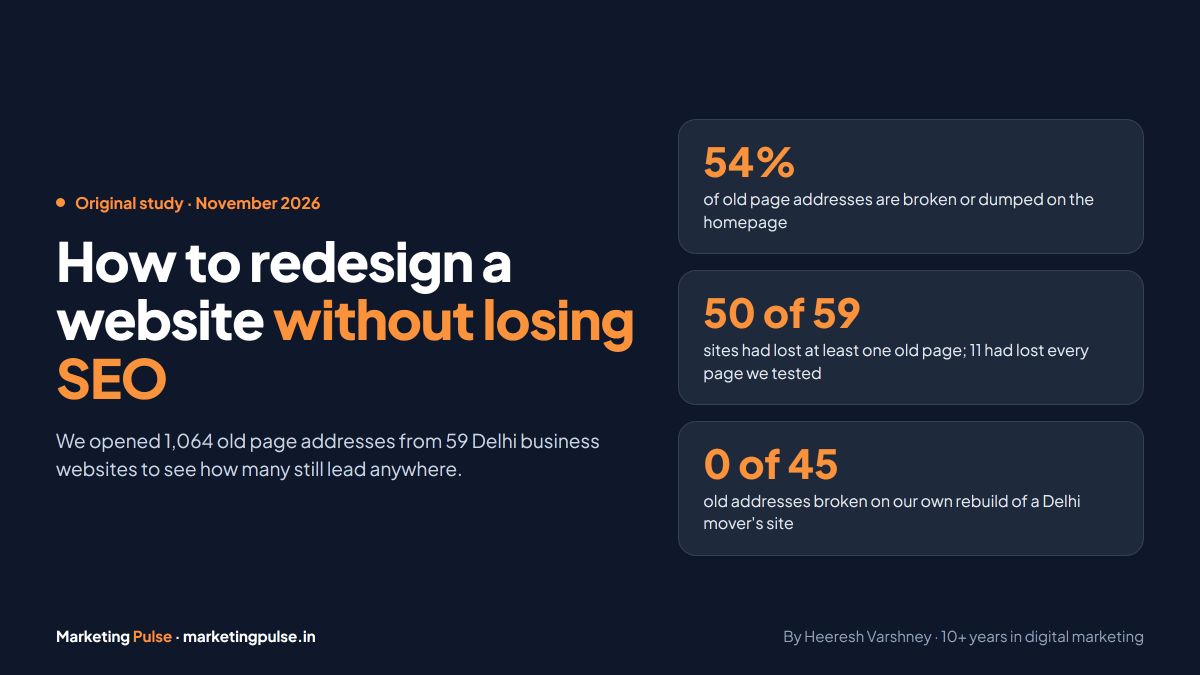
We wanted to know how often this happens to ordinary businesses, so we tested it. We took 59 Delhi business websites, pulled the inner pages each one had between 2019 and 2023 from the Internet Archive's Wayback Machine, and opened 1,064 of those old addresses on the live sites on 6 November 2026. 54% of them no longer reach a real page. Below are the full results, why this matters for SEO, the six steps we follow on our own rebuilds, and a free way to list every page your old site ever had, even if the old site is already gone.
What we found when we opened 1,064 old page addresses
Each address in the test was a real page once: the Wayback Machine saved it with a normal "200 OK" response at some point between 2019 and 2023. We opened each one again the way a visitor would, following any redirects, and sorted the result into four outcomes.
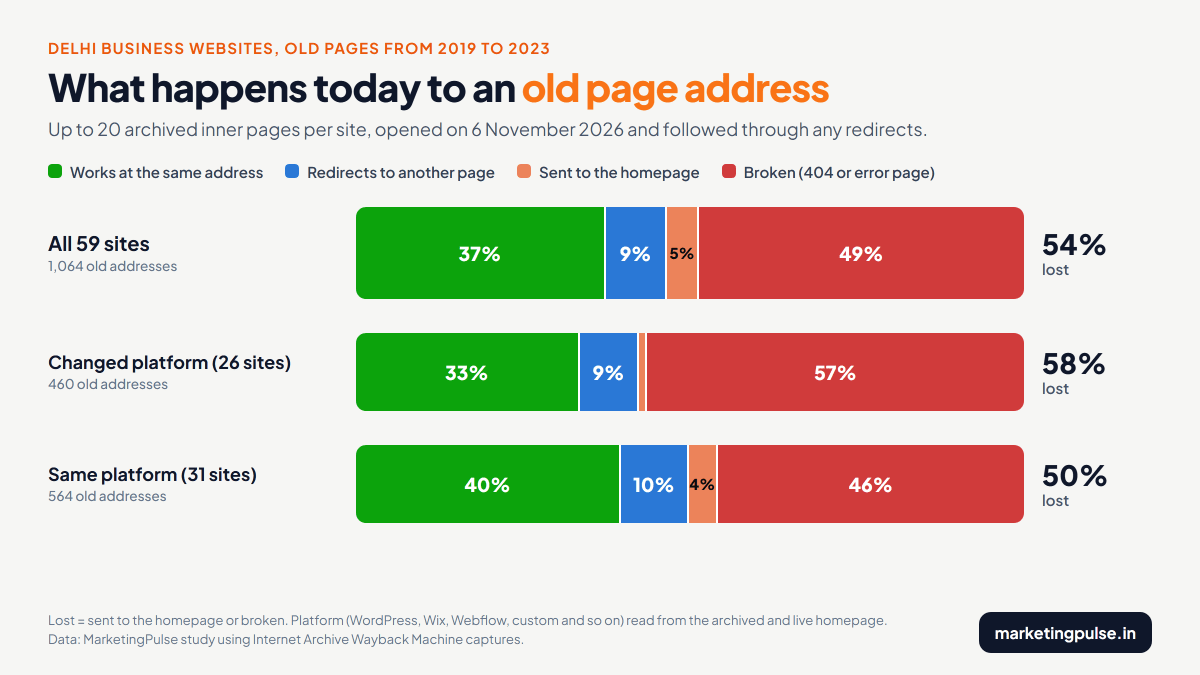
- 37% still work at the same address. These sites kept their page addresses through whatever changes they made.
- 9% redirect to a different page on the same site. Someone set up a redirect, which is the right fix when a page has to move.
- 5% land on the homepage. The old page is gone and the site sends everyone to the front door. Google warns that this "might be treated as a soft 404" (Google Search Central).
- 49% are broken. A "page not found" error, or a page that loads but shows the site's own not-found message.
The average hides how uneven this is. 50 of the 59 sites had lost at least one old page, 33 had lost half or more of the pages we tested, and 11 had lost every one. Only 9 sites still answered every old address correctly. The median site had lost 50% of its old pages.
- Every page still works9 sites
- Lost under a quarter9 sites
- Lost a quarter to half8 sites
- Lost half or more, not all22 sites
- Lost every page we tested11 sites
Lost means broken or sent to the homepage. Up to 20 old addresses tested per site on 6 November 2026. Data: MarketingPulse.
We also checked whether the site had changed platform. For each site we compared the earliest archived homepage with today's homepage and read what it was built on: WordPress, Wix, Webflow, a custom build and so on. 26 sites had switched, more than half of them to WordPress, and they had lost 58% of their old addresses. The 31 sites still on the same platform had lost 50%. Switching platform makes it worse, but the second number is the more useful one: redesigns and tidy-ups on the same system break old addresses almost as often.
- Changed platform (26 sites)58%
- Same platform (31 sites)50%
460 and 564 old addresses respectively. Sites where we could not read the platform from both homepages are left out. Data: MarketingPulse, 6 November 2026.
One more finding matters for step 5 below. When we opened a made-up address on each site, 9 of the 59 sites did not answer with a proper "not found" (404) response. Most returned a normal page, often the homepage or a page with an error message written on it. On sites like these, broken pages look fine to a quick check, which is how they go unnoticed for years.
Why a broken old address costs more than one page
Google is direct about what happens to a page that starts returning an error: "URLs that are already indexed and return a 4xx status code are removed from the index" (Google Search Central). The ranking that page earned does not pass to the new design by itself. Links from other websites stop helping you too, while a permanent redirect keeps their value: "301 and other permanent redirects don't cause a loss in PageRank" (Google).
People follow the old addresses as well. The link in your Google Business Profile, your JustDial and IndiaMART listings, a blog that recommended you in 2021, a brochure PDF, a WhatsApp message a customer forwarded last year: all of them point at addresses on your current site. After a careless relaunch they all lead to an error page, and each visitor is left to hunt through your new menu for what they wanted.
Lost pages are common across the whole web. Pew Research Center found that 38% of webpages that existed in 2013 were no longer available a decade later, and that 23% of news pages and 21% of government pages contained at least one broken link (Pew Research Center, May 2024).
To keep this in proportion, a 404 is not a penalty on your whole site. Google's advice is to fix the 404s you link to yourself or list in your sitemap, and "if a page has been moved, you should return a 3XX redirect to the new page" (Search Console Help). The damage from a bad redesign comes from losing many pages that used to rank and bring enquiries, all on the same day.
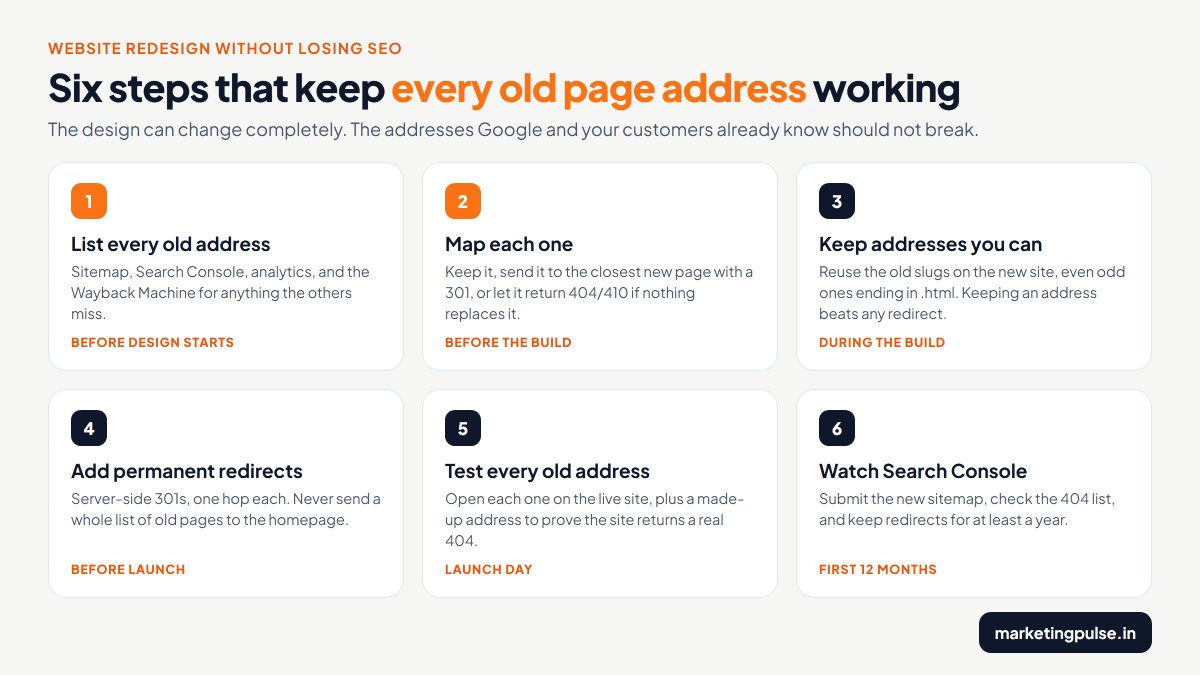
Step 1: List every old address before anything changes
Do this while the old site is still live, before the designer opens a mockup. Use more than one source, because each one misses something.
| Source | What it gives you | What it misses |
|---|---|---|
| Your XML sitemap (usually yoursite.com/sitemap.xml) | The pages the site tells Google about | Pages dropped from it over the years; many small sites have no sitemap |
| Google Search Console | Pages that get clicks (Performance report) and pages other sites link to (Links report) | Pages with no impressions or links; needs owner access |
| Google Analytics landing pages | Pages people actually arrive on | Anything from before tracking was installed |
| A crawler such as Screaming Frog | Every page linked from the current site, free up to 500 addresses | Pages nothing links to any more; needs the old site online |
| The Wayback Machine | Every address the archive saved, going back years | Pages it never visited, but it works even if the old site is offline |
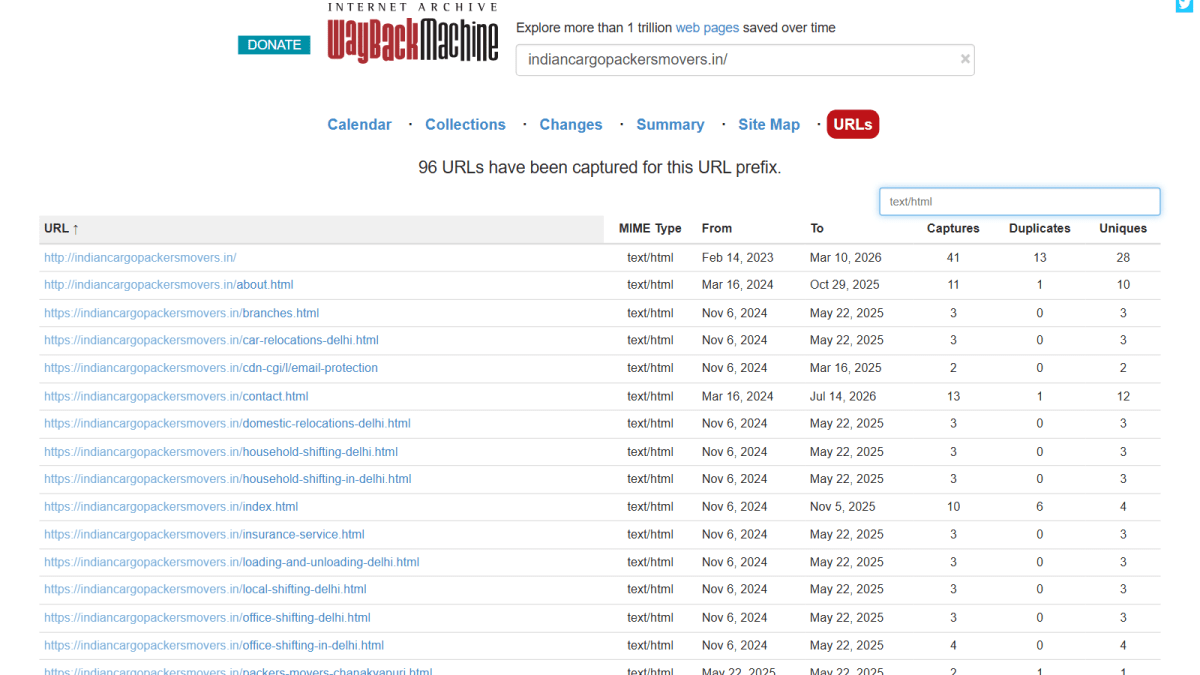
The Wayback Machine is easy to overlook, and for small businesses in India it is often the only source available. The old developer may hold the hosting login, the Search Console account may belong to an agency that no longer answers, or the old site may already be gone. The archive needs none of that. Its CDX service returns a plain list of saved addresses for any domain, free and without an account (Wayback CDX documentation).
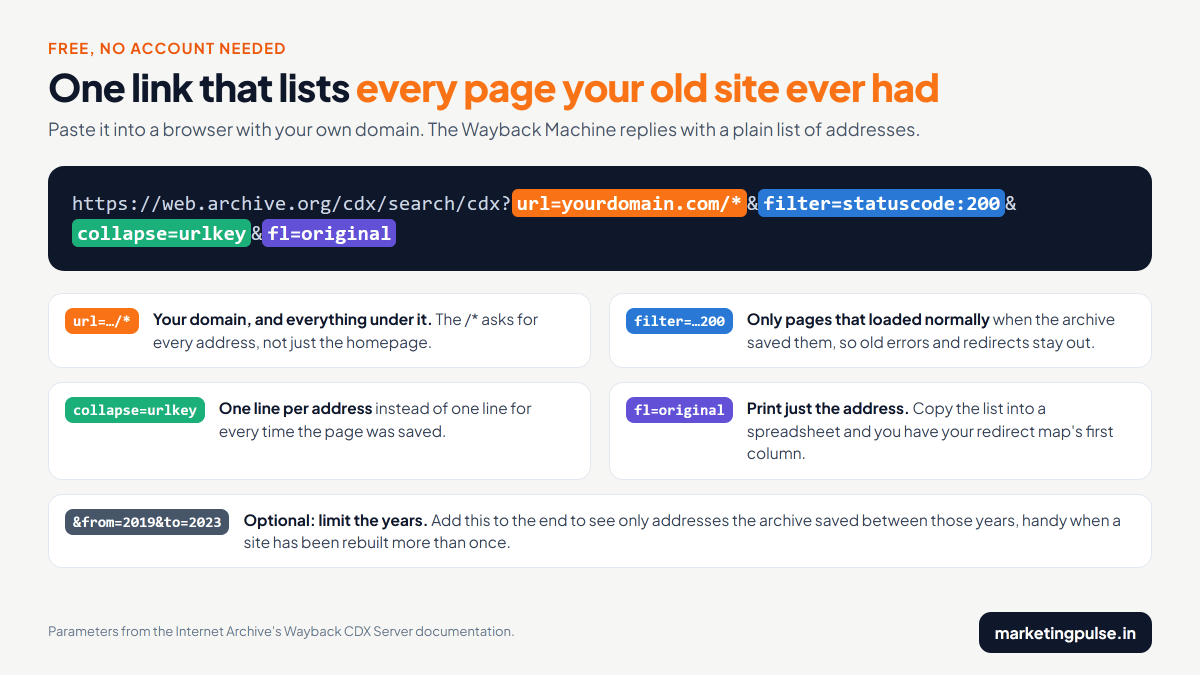
Here is the same link for a site we rebuilt this year, so you can see what comes back: the old page list for Indian Cargo Packers and Movers. It is a plain text page with one address per line. Copy it into a spreadsheet, delete the images, PDFs and admin pages, and what remains is the first column of your redirect map.
Step 2: Decide what each old address becomes
Add a second column to the spreadsheet: where each old address should end up. Every row gets exactly one of these answers.
| The old page | What to do | Response code |
|---|---|---|
| Exists on the new site with the same content | Keep the exact same address | 200 |
| Moved or renamed | Redirect it to its new address | 301 (or 308) |
| Merged with other pages into one | Redirect all of them to the merged page | 301 |
| Removed, but a close substitute exists, such as a broader service page | Redirect it to that page | 301 |
| Removed, with nothing similar on the new site | Let it return not found | 404 or 410 |
"Send it to the homepage" is not on the list. Google's site move guide says "Don't redirect many old URLs to one irrelevant single URL destination, such as the home page of the new site", because it confuses visitors and can be treated as a soft 404. The same guide allows the merge case in the table, where several old pages really did become one new page (Google Search Central).
Step 3: Keep the addresses you can
Keeping an address is cheaper and safer than redirecting it. If the old site called a page /office-shifting-delhi.html, the new site can use that exact address, even if the new platform would prefer something tidier. A kept address has no redirect rule to maintain, adds no extra hop, and cannot break when someone tidies up the redirect file two years later.
Most website builders and content systems let you set each page's address by hand. Ask your developer to do this for every page that brings visitors or has links pointing to it. Rename only where the old address is wrong or misleading, and redirect those.
Step 4: Add permanent redirects the right way
- Use server-side permanent redirects. Google's guide says "Use server side permanent redirects if technically possible" and recommends 301 or 308 (Google). A 302 is temporary, and Google keeps showing the old address in its results (Google).
- Make each one a single hop. Old address straight to final address. If the site already has redirects from an earlier redesign, update them as well so they point to the new page directly and do not form a chain.
- Cover the variants. The same page can be reached over http and https, with and without www, and with and without a trailing slash. Test the version saved in the archive, because that is the one people linked to.
- Put them where your platform expects them. WordPress sites usually use a redirect plugin, Apache hosting uses the .htaccess file, and Shopify, Wix, Vercel and Netlify each have their own redirect settings or file. Ask for the redirect list to be delivered with the new site.
- Keep them. Google's guidance is to keep redirects "for as long as possible, generally at least 1 year", and from a visitor's point of view to "consider keeping redirects indefinitely" (Google).
Step 5: Test every old address on launch day
Open every address from your spreadsheet on the live site. Each one should either load at the same address or make one redirect to the right new page. Anything else goes back to the developer the same day. A crawler that accepts a pasted list of addresses, or a short script, does this in minutes, and for a 40 page site a browser and half an hour is enough.
Then open an address that has never existed, such as yoursite.com/this-page-does-not-exist. It should show a not-found page with a real 404 response. In our study, 9 of the 59 Delhi sites failed this check. If your site returns the homepage or a normal page for addresses that do not exist, every broken link on it will look healthy to a quick test.
Check that the new site is open to Google too. Staging copies are often hidden with a noindex tag or a robots.txt block, and Google's site move guide reminds owners: "Don't forget to remove any noindex or robots.txt blocks that were only needed for the migration." A noindex left in place means Google will "drop that page entirely from Google Search results" (Google).
Step 6: Watch Search Console for the next year
- Submit the new sitemap in Search Console on launch day.
- Check the Page indexing report every week for the first month for old addresses showing as not found, and fix any you missed (Search Console Help).
- Compare clicks per page in the Performance report against the same weeks before launch, page by page, so a single lost page stands out.
- Update the links you control: Google Business Profile, social profiles, directory listings, email signatures and the internal links inside the new site.
- Expect some movement. Google says visibility "may fluctuate temporarily during the move" and that "a small to medium-sized website can take a few weeks for most pages to move" (Google).
A real example: a Delhi mover rebuilt without losing a page
In 2026 we rebuilt the website of Indian Cargo Packers and Movers, a Delhi moving company with 28 branches in Delhi NCR. The new site has a completely different design from the old static one. The page addresses stayed the same.


Before the build we pulled every address the Wayback Machine had saved for the old site and dropped images and files, which left 45 page addresses. We built the new site on those addresses, keeping the old .html endings and the Delhi locality pages, and opened every one after launch:
| Result | Old addresses | Examples |
|---|---|---|
| Loads at the same address | 41 | about.html, branches.html, packers-movers-dwarka.html |
| One permanent redirect to the matching page | 4 | office-shifting-delhi.html to office-shifting-in-delhi.html |
| Broken | 0 | None |
A made-up address on the new site returns a proper 404, so the 41 working pages are real pages and not a catch-all. The full check, with larger before and after screenshots, is on our web design page.
Other things a redesign can break
Page addresses cause the biggest losses, but check these as well before and after launch.
| What | What goes wrong | How to check |
|---|---|---|
| Page titles and headings | Pages that ranked get generic new titles such as "Services" | Copy the old titles into the redirect spreadsheet and compare |
| The text itself | Paragraphs that answered searchers are cut for a cleaner look | Compare old and new pages side by side; the Wayback Machine keeps the old text |
| Internal links | Menus and footers still point at old addresses, adding a redirect to every click | Crawl the new site and look for links that redirect |
| Noindex, robots.txt and canonical tags | Staging settings go live and hide pages from Google | View the page source on the live site for each page template |
| Tracking | Analytics, call tracking and form goals are missing from the new templates | Make a test enquiry on launch day and find it in your reports |
| Speed and mobile layout | A heavier design loads slowly on phones | Run Lighthouse on the old and new site; see our responsive design guide |
Already redesigned and lost traffic?
The same method works after the fact. Open the Wayback link from step 1 with your domain, try each old address on the current site, and add a permanent redirect for every one that is broken or lands on the homepage, pointing to the closest matching page. Then resubmit your sitemap in Search Console. Google keeps revisiting old addresses it knows about, so it will find the redirects; how quickly depends on how often it crawls your site.
If some old pages had content that no longer exists anywhere on the new site, the Wayback Machine still has their text. Rebuilding the most important ones at their old addresses is often the quickest way to win their searches back.
Questions people ask about redesigns and SEO
Will a website redesign affect my SEO?
It can. New colours, layout and images on the same pages and addresses carry little risk. The damage comes from changed or deleted page addresses, removed text, and staging settings such as noindex going live. If you follow the six steps above, a redesign should not cost you rankings.
How long does SEO take to recover after a redesign?
If addresses were kept or redirected properly, Google says a small to medium site can take a few weeks for most pages to move, with some temporary movement in rankings (Google). If pages were lost without redirects, recovery only starts after you add the redirects and Google crawls them.
Should I redirect all my old pages to the homepage?
No. Google advises against sending many old addresses to one irrelevant page such as the homepage and says it can be treated as a soft 404 (Google). Redirect each old page to its closest new match, and let pages with no replacement return 404 or 410.
How long should I keep 301 redirects after a redesign?
At least one year, according to Google's site move guide. We keep them for good, because links and bookmarks to old addresses never fully disappear.
How do I find the old URLs of my website if the old site is already down?
Use the Wayback Machine's CDX link, https://web.archive.org/cdx/search/cdx?url=yourdomain.com/*&filter=statuscode:200&collapse=urlkey&fl=original, with your own domain in place of yourdomain.com. It lists every page address the archive saved, without access to the old hosting, CMS or Search Console.
Can I change my domain name at the same time as the redesign?
You can, but then every address changes and every page needs a redirect to the new domain. We prefer to launch the redesign first and move the domain once the new site is stable, so that if traffic drops it is clear which change caused it.
The short version
A redesign can change everything about how a site looks and still keep every page where it was. In our test of 1,064 old addresses on 59 Delhi business websites, 54% no longer reached a real page, and sites that had switched platform lost far more than sites that had not. List every old address before you start, keep the ones you can, redirect the rest one by one, and test all of them on launch day.
If you are planning a new website, our web design and development service includes this check on every rebuild, and our guide to website costs in Delhi covers what a rebuild should cost. To have your current site's old pages listed and checked first, send us the address.
Planning a redesign?
Send us your website. We will list its old page addresses and check them before anything changes, free.

Written by
Heeresh Varshney
Founder & MD, MarketingPulse · 10+ years in digital marketing
First-generation entrepreneur with proven digital marketing strategies and a long list of happy clients. Heeresh loves using advanced technology as a solution for business growth — and can help you hit your business targets with digital marketing that is measured, not guessed. More about Heeresh.